

You’re coding faster. You feel more productive. GitHub Copilot is autocompleting your functions, and Claude is debugging your async nightmares. But here’s what nobody’s asking: What are you actually learning?
Anthropic just dropped a research bomb that should make every developer using AI tools stop and think. In a rigorous randomized controlled trial published January 29, 2026, researchers Judy Hanwen Shen and Alex Tamkin discovered something unsettling: developers using AI assistance to learn new programming concepts scored 17% lower on comprehension tests than those who coded manually. That’s a two-grade-point difference.
The kicker? AI didn’t even make them significantly faster.
This isn’t another hot take about AI replacing developers. This is hard experimental evidence that the way we’re using AI right now might be quietly eroding the very skills we need to supervise it.
The Experiment: Learning Trio with and without AI
The Anthropic team designed a clever study around Python’s Trio library, a modern asynchronous programming framework that’s less well-known than asyncio. They recruited 52 professional developers (all with 1+ years of Python experience) and split them into two groups:
Control Group (No AI): Complete two Trio coding tasks using only documentation and web search.
Treatment Group (AI Assistance): Same tasks, but with access to GPT-4o as a coding assistant.
Both groups had 35 minutes. After completing the tasks, everyone took a 27-point quiz covering conceptual understanding, code reading, and debugging.
The results were stark.
The Results: Speed vs. Mastery
Quiz Performance: A 17% Knowledge Gap
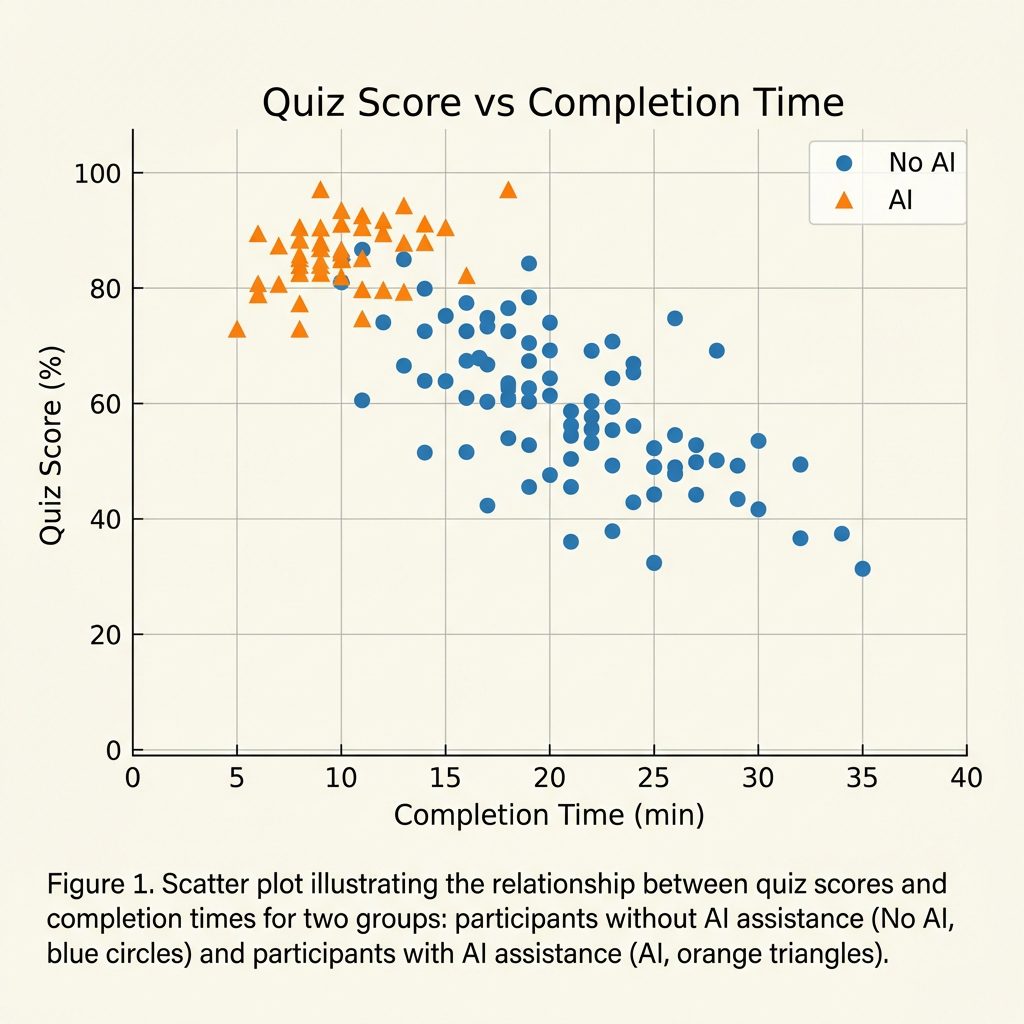
The AI group averaged 52.5% on the quiz. The no-AI group? 69.5%.
That’s a 4.15-point difference on a 27-point test (Cohen’s d = 0.738, p = 0.01). In academic terms, that’s the difference between a D and a C+.
The gap was most pronounced in debugging questions, where developers who’d encountered and resolved errors independently during the task significantly outperformed those who’d delegated error-fixing to AI.
Task Completion: No Significant Speed-Up
Here’s where it gets interesting. The AI group completed the tasks in an average of 23.5 minutes. The control group? 24.5 minutes.
Not statistically significant.
Wait—AI didn’t make them faster? How is that possible when GPT-4o can generate the entire solution on demand?
The Six Personas: How Developers Actually Use AI
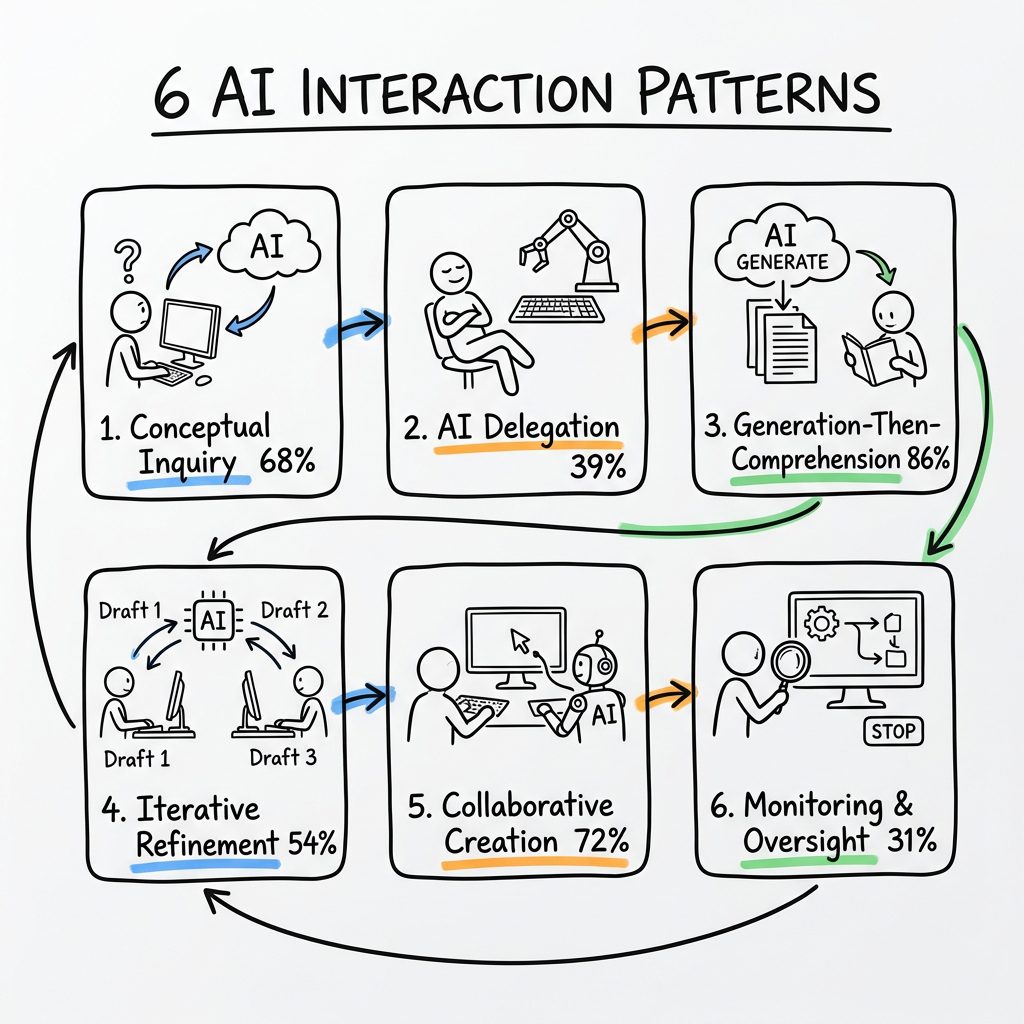
The researchers watched screen recordings of all 51 participants and identified six distinct interaction patterns. Three led to high quiz scores (65-86%). Three led to catastrophic learning failure (24-39%).
High-Scoring Patterns (Cognitive Engagement)
1. Conceptual Inquiry (68% avg score, 22min)
Only asked AI conceptual questions
Resolved all errors independently
Fastest high-scoring pattern
2. Generation-Then-Comprehension (86% avg score, 24min)
Generated code with AI
Then asked follow-up questions to understand it
Highest quiz performance
3. Hybrid Code-Explanation (65% avg score, 24min)
Requested code AND explanations in the same query
Read and internalized the explanations
Low-Scoring Patterns (Cognitive Offloading)
4. AI Delegation (39% avg score, 19.5min)
Blindly copy-pasted AI output
Fastest completion, worst learning
The “productivity trap”
5. Progressive AI Reliance (35% avg score, 22min)
Started with questions, ended with full delegation
Mastered Task 1, learned nothing from Task 2
6. Iterative AI Debugging (24% avg score, 31min)
Repeatedly asked AI to fix errors
Slowest AND lowest-scoring
The worst of both worlds
The pattern is clear: cognitive effort predicts learning. Developers who stayed engaged—asking “why” instead of just “what”—retained their skills.
Why AI Didn’t Speed Things Up
The researchers found that participants in the AI group spent significant time composing queries. Some spent up to 11 minutes total just typing questions and waiting for responses. One developer spent 6 minutes crafting a single query.
This “AI interaction tax” ate into the productivity gains. Meanwhile, the control group was actively coding, encountering errors, and building mental models.
There’s a deeper insight here: time spent thinking about what to ask AI is cognitively valuable. But only if you’re asking the right questions.
The Error Gap: Why Debugging Matters
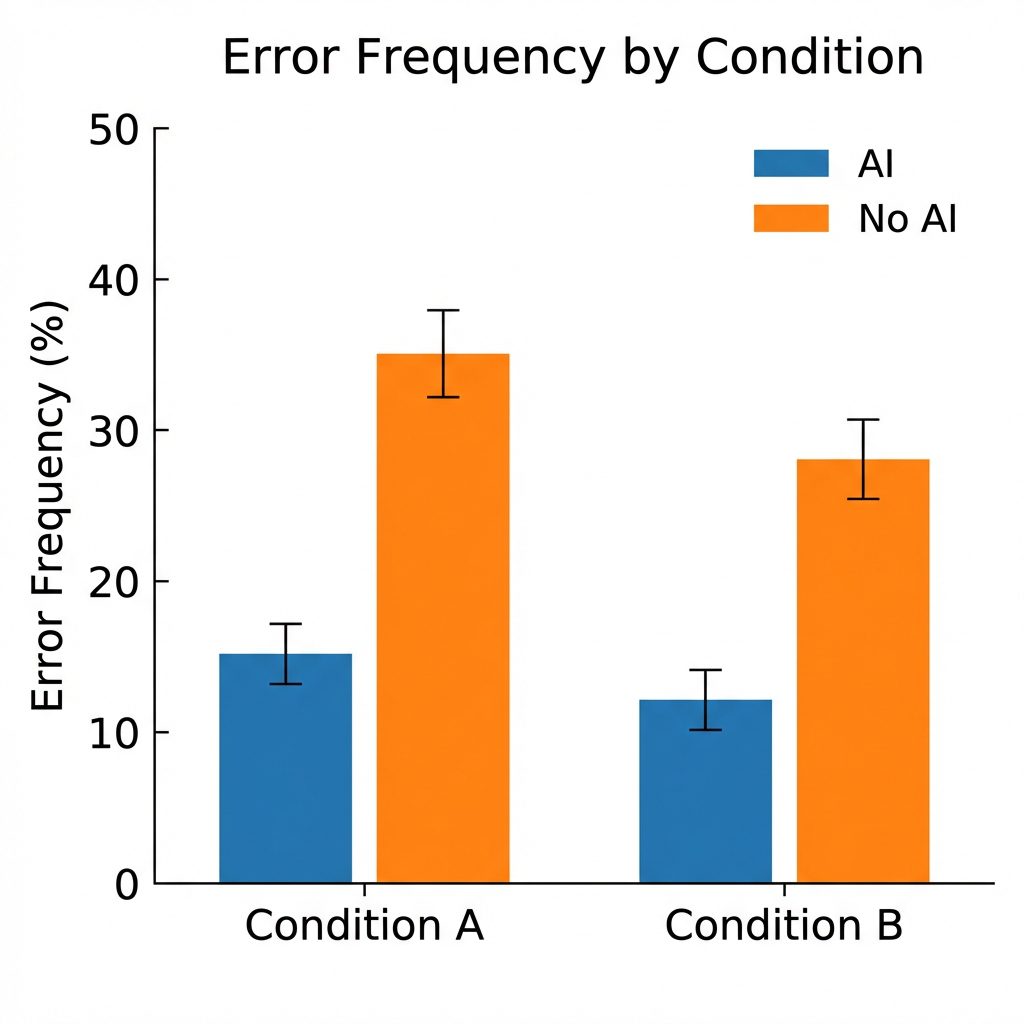
Developers in the control group encountered a median of 3 errors per task. The AI group? 1 error.
That sounds like a win for AI, right? Wrong.
Those errors were learning opportunities. The control group wrestled with RuntimeWarning: coroutine was never awaited and TypeError: expected async function, got coroutine object. These are the exact concepts tested in the quiz.
The AI group never saw those errors. They never built the mental model of how Trio’s nurseries work, how await keywords propagate, or why error handling in async code is different.
When quiz time came, the control group had battle-tested knowledge. The AI group had… vibes.
The Paste vs. Type Divide
Another fascinating finding: developers who manually typed AI-generated code performed similarly to those who copy-pasted it. Both groups scored low.
This challenges the common advice to “type it out to learn it.” The act of typing doesn’t create understanding. Cognitive engagement does.
The developers who scored highest were those who:
1. Asked for explanations alongside code
2. Requested conceptual clarifications before generating
3. Used AI to verify their own understanding
What This Means for the Industry
For Junior Developers
If you’re learning to code with AI assistance, you’re playing with fire. The study found that the “AI Delegation” pattern—blindly accepting AI output—leads to almost zero skill acquisition.
You might ship features faster in the short term. But you’re not building the debugging intuition, the error-pattern recognition, or the conceptual models that separate senior engineers from code monkeys.
For Engineering Managers
That 26% productivity boost from GitHub Copilot you’ve been celebrating? It might be creating a generation of developers who can’t debug production issues without AI.
The researchers warn: “As humans rely on AI for skills such as brainstorming, writing, and general critical thinking, the development of these skills may be significantly altered.”
For AI Tool Builders
The study identified three “safe” interaction patterns that preserve learning:
Conceptual-first queries
Explanation-augmented generation
Verification-focused debugging
AI coding tools should nudge users toward these patterns. Imagine a Copilot that refuses to generate code until you explain what you’re trying to do. Or a Claude that automatically appends explanations to every code block.
The Automation Paradox Returns
This isn’t new. Aviation has dealt with this for decades.
When autopilot systems became sophisticated, pilot skills atrophied. Then, when systems failed, pilots couldn’t manually land the plane. The solution? Mandatory manual flight hours to maintain competency.
We’re seeing the same pattern in software engineering. As AI handles more of the “easy” stuff, developers lose the foundational skills needed to handle the hard stuff—or to supervise the AI when it hallucinates.
The difference? In aviation, skill degradation kills people. In software, it just… makes your app slower, buggier, and more vulnerable. Oh wait.
The Practical Takeaway
If you’re using AI coding tools (and you should be), here’s how to avoid the skill formation trap:
1. Ask “Why” Before “What”
Don’t ask: “Write a function to fetch user data”
Ask: “What’s the best pattern for async data fetching in this context, and why?”
2. Generate, Then Explain
After AI writes code, ask it to explain the design choices. Better yet, explain it to yourself first, then verify with AI.
3. Embrace Errors
When AI-generated code fails, resist the urge to immediately ask AI to fix it. Spend 5 minutes debugging manually. You’ll learn more from one error than from ten perfect generations.
4. Use AI for Verification, Not Delegation
Write your own solution first. Then ask AI to review it. This inverts the power dynamic.
5. Track Your Cognitive Offloading
If you’re asking AI more than 5 questions per task, you’re probably offloading too much. The study found that high-scoring developers asked 2-4 conceptual questions, not 15 debugging queries.
The Bottom Line
AI coding assistants are powerful. They’re not going away. But the Anthropic study proves what many of us suspected: productivity and learning are not the same thing.
You can ship code faster with AI. Or you can become a better engineer. With current usage patterns, it’s hard to do both.
The developers who’ll thrive in the AI era aren’t the ones who delegate the most to AI. They’re the ones who use AI to amplify their curiosity, not replace it.
Because here’s the thing: when GPT-5 or Claude Opus 4 inevitably hallucinates a subtle security vulnerability into your production code, you’ll need to catch it. And you can’t catch what you don’t understand.
The quiz scores don’t lie. Cognitive engagement matters. Choose your AI interaction pattern wisely.
FAQ
Does this mean I shouldn’t use AI coding tools?
No. It means you should use them thoughtfully. The study found that developers who asked for explanations alongside code, or who used AI for conceptual questions only, maintained high learning outcomes. The problem isn’t AI—it’s passive delegation.
What about experienced developers? Does this apply to them too?
The study focused on learning new skills (the Trio library was unfamiliar to all participants). For tasks using existing knowledge, AI likely provides pure productivity gains. But whenever you’re learning something new—a new framework, language, or paradigm—the cognitive offloading risk applies.
How can AI tool companies fix this?
The researchers suggest AI tools could implement “learning modes” that prioritize explanation over generation, require users to articulate their intent before receiving code, or automatically inject conceptual questions. Some tools like ChatGPT’s “Study Mode” are already experimenting with this.
What’s the long-term risk if we ignore this?
A generation of developers who can code with AI but can’t code without it. More critically: developers who lack the debugging skills and conceptual understanding needed to supervise AI-generated code in high-stakes applications. The researchers call this the “automation paradox”—the better the automation, the worse humans become at the task, making them less able to catch automation failures.
How does this compare to other studies on AI and productivity?
Most prior studies (like the famous GitHub Copilot study showing 55% faster task completion) measured output, not learning. This is the first rigorous RCT to measure skill acquisition. The findings suggest that productivity studies may be measuring short-term gains while missing long-term skill erosion.