


Have you ever tried to run a cutting-edge AI model only to have your system crash because you ran out of memory? Or worse, spent hours downloading a 50GB model file just to discover your GPU cannot handle it?
This is a frustrating reality for AI developers and researchers. You need to know upfront whether your hardware can support a model before committing to downloads that can take hours or even days.
Enter hf-mem, a lightweight command-line tool that solves this exact problem by estimating the memory requirements for any model on the Hugging Face Hub in seconds, not hours.
How It Works (The “Zero-Download” Magic)
What makes hf-mem truly elegant is how it works. Instead of downloading massive multi-gigabyte model files, it uses HTTP range requests to fetch only the first ~100KB of each .safetensors file from the Hugging Face Hub.
This small chunk contains all the metadata needed, specifically the distribution of weights including parameter counts and data types, to accurately calculate total memory requirements for inference.
The tool works with models stored in the SafeTensors format and supports popular frameworks:
– Transformers (language models)
– Sentence Transformers (embeddings)
– Diffusers (image generation)
The best part? It only depends on a single library (httpx) and can be run instantly using uvx without any installation hassle.
Installation: The uvx Way
If you don’t know what uvx is, it’s a tool runner (like npx) that executes Python tools in temporary isolated environments without permanently installing them.
Quick Start (No Installation)
uvx hf-mem --model-id MiniMaxAI/MiniMax-M2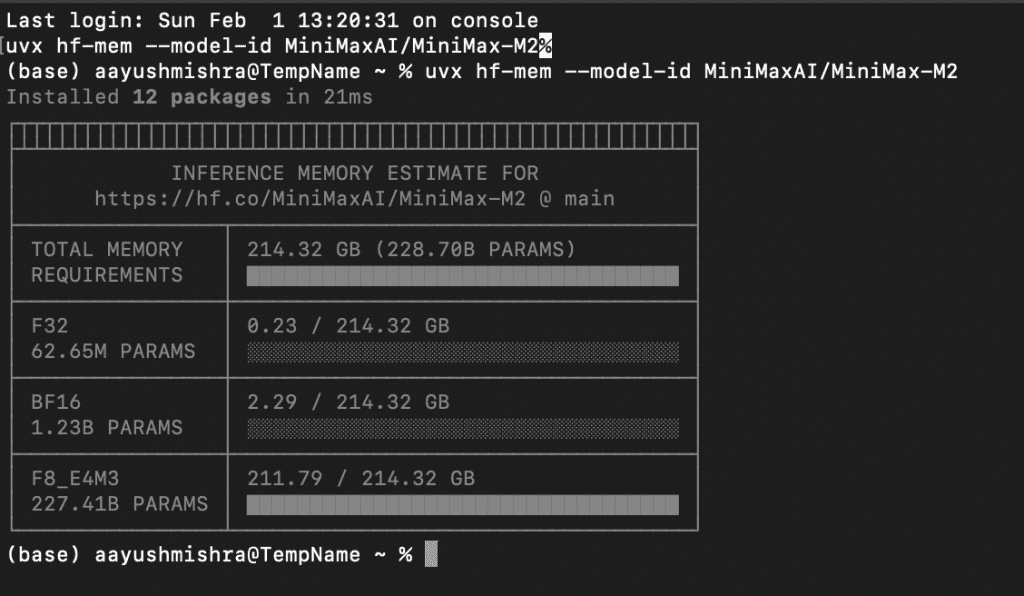
That’s it. uvx downloads it, runs it, and cleans up after itself.
Permanent Installation (Optional)
pip install hf-mem
Verify:
hf-mem --help
Real-World Examples
Example 1: Language Model (DeepSeek-R1)
Let’s check if DeepSeek-R1-Distill-Llama-70B fits on a dual RTX 3090 setup (48GB total VRAM).
hf-mem model-id deepseek-ai/DeepSeek-R1-Distill-Llama-70B
Output:
Model: deepseek-ai/DeepSeek-R1-Distill-Llama-70B
Total Parameters: 228.7B
--------------------------------------------------
Memory by Precision:
  FP32 (32-bit):     0.02 GB
  FP16 (16-bit):     2.91 GB
  INT8 (8-bit):    211.79 GB
--------------------------------------------------
Total Memory:      214.72 GB
Fit on 48GB VRAM?  ❌ NO
Verdict: You need a system with at least 214GB of RAM to run this model. The bulk (211.79GB) is stored in 8-bit format, with tiny portions in 16-bit and 32-bit for parts needing higher precision.
Example 2: Diffusion Model (Flux.1-dev)
For complex diffuser models, hf-mem breaks down memory usage by individual pipeline components.
hf-mem model-id black-forest-labs/FLUX.1-dev
Output:
Pipeline: FLUX.1-dev
--------------------------------------------------
CLIP Text Encoder:       1.39 GB
T5 Text Encoder:         9.52 GB
Transformer (UNet):     23.80 GB
VAE (Image Encoder):     0.17 GB
--------------------------------------------------
Total Pipeline Memory:  34.88 GB
This granular breakdown tells you exactly where your memory will be allocated. Perfect for optimizing ComfyUI workflows.
Example 3: Embedding Model (BGE-Large)
hf-mem model-id BAAI/bge-large-en-v1.5
Output:
Model: BAAI/bge-large-en-v1.5
Total Parameters: 335M
--------------------------------------------------
Memory by Precision:
  FP32 (32-bit):     1.25 GB
--------------------------------------------------
Total Memory:        1.25 GB
Verdict: This can run on any modern GPU. Almost all weights are stored in FP32 (full precision).
Why This Matters for Local AI
Efficiency is the new alpha. With models like GLM-4.7 and Soprano 1.1 pushing the limits of consumer hardware, precision is mandatory.
Most users forget that KV cache grows linearly with context. A model that fits at 4k tokens might crash at 32k. While hf-mem is still evolving with plans to incorporate context length considerations for language models and better support for Mixture-of-Experts architectures, it already provides an invaluable service.
It lets you make informed decisions about model deployment before you waste time, bandwidth, and storage on downloads that won’t work on your hardware.
The Bottom Line
If you are a local LLM runner, hf-mem belongs in your .zshrc aliases right next to git and python. It is the “measure twice, cut once” tool for the AI age.
Stop guessing. Start estimating.
FAQ
Can I check quantized models?
Yes. The tool automatically detects the precision (INT8, INT4, FP16, etc.) from the SafeTensors metadata.
Does it work for vision models?
Absolutely. It supports any model architecture hosted on Hugging Face that uses SafeTensors, including Diffusers pipelines.
Is it accurate?
It is mathematically exact for parameter weights. The calculations are based on actual tensor shapes and data types from the model files.
What about KV cache for LLMs?
The v0.4.1 update includes experimental KV cache estimation. Use the --context flag to specify sequence length.