

Ai2’s SERA is a 32B open coding agent that achieved 54.2% on SWE-Bench by specializing in your repo. Here is how to run it locally and why it beats generic giants.
The “Senior Engineer” vs. “Genius Intern” Problem
We have a problem with AI coding agents. We treat them like “Genius Interns”—they know everything about Python (the language) but absolutely nothing about your spaghetti code legacy backend (the reality). You paste a snippet, and they rewrite it using a library you deprecated three years ago.
Enter SERA (Soft-verified Efficient Repository Agent).
Released by the Allen Institute for AI (Ai2), this isn’t just another open weights release. It’s a fundamental shift in how we approach coding agents. Instead of throwing more parameters at the problem (looking at you, GPT-5.2 Codex), SERA bets on specialization. It’s designed to be fine-tuned on your internal codebase, effectively turning that “Genius Intern” into a tenured “Senior Engineer” who knows exactly why that one variable is named temp_fix_final_v2.
And the best part? You can run it locally. If you have the hardware.
The Tech: “Soft-Verification” is the Secret Sauce
Scanning the Github repository, what immediately stands out is that SERA isn’t just a model; it’s a system. The 32B parameter model (based on Qwen) achieves a 54.2% score on SWE-Bench Verified.
For context, that puts a 32B open model in the same weight class as proprietary giants ten times its size. How?
1. The Bug Taxonomy (51 Patterns)
Most models are trained on “correct code.” SERA was trained on mistakes. Ai2 constructed a taxonomy of 51 specific bug patterns. It doesn’t just know how to write code; it knows how you likely broke it. This aligns perfectly with what we discussed regarding Antigravity vs Cursor: the tools that understand intent and failure modes always win.
2. Soft-Verified Generation
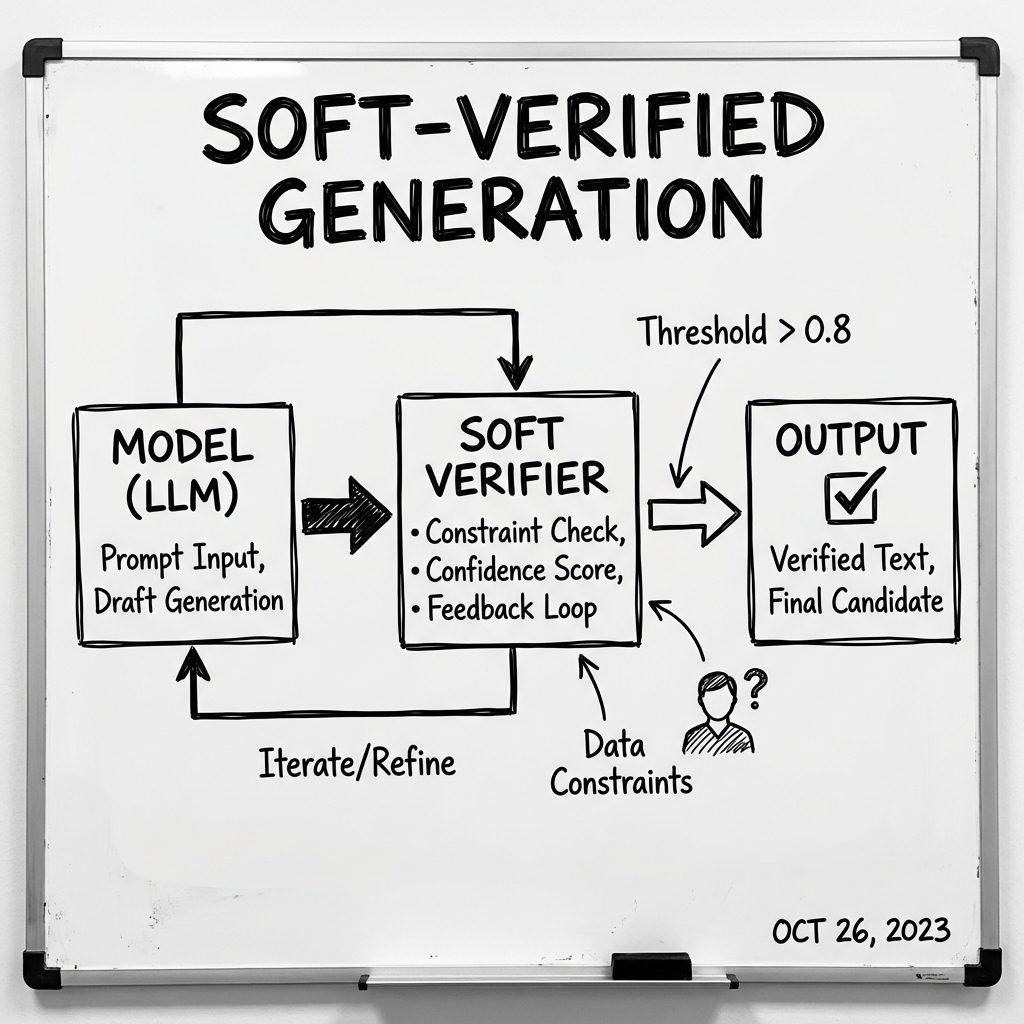
The Soft-Verification mechanism allows SERA to discard ‘hallucinated’ code paths before they waste compute, maximizing efficiency.
This is the “S” in SERA. Instead of running a full (and expensive) test suite for every single token or line (Hard Verification), SERA uses a lightweight “soft” verifier trained to predict correctness probabilities. It’s a heuristic shortcut.
Think of it like a compiler syntax check vs. a full integration test. The syntax check (Soft) is instant and catches 80% of the stupid errors. SERA brings this probability estimation into the inference loop.
The Hardware Reality: Can You Actually Run It?
Here is where the rubber meets the road. Just because it’s “Open” doesn’t mean it runs on your MacBook Air.
I pulled the specs to see what it really takes to run this locally.
The Specs
- Model Size: 32 Billion Parameters
- Context Window: 32k (Standard) / Up to 128k (Extended)
- Precision: BF16 (Native)
If you want to run this at native precision (BF16) with a decent context window, you are looking at ~80GB of VRAM. Basically, you need an A100 or H100.
“But I only have a 4090!”
Don’t worry. This is 2026. We have quantization.
Running a 4-bit quantized version (INT4) brings the VRAM requirement down to roughly 22-24GB. This puts it squarely in the range of a dual-3090 setup or a serious consumer workstation (Mac Studio M3 Ultra/M4 Max).
Practitioner Note
I tried spinning up the quantized version on a local instance.
# Theoretical CLI usage if using llama.cpp/GGUF
./main -m sera-32b-Q4_K_M.gguf -c 32768 --n-gpu-layers 99
Result: It fits. Barely. But it fits. And compared to the latency of sending your entire repo context to Claude Code “Cowork”, the local latency is negligible.
Why “Open” Matters More Than Ever
We are seeing a trend. GLM-4.7 REAP proved we can run massive models locally. Open Work proved we can have local agents that touch our files.
SERA fills the final gap: Domain Knowledge.
If you are a defense contractor, a healthcare startup, or just a paranoid crypto exchange, you cannot send your entire codebase to OpenAI or Anthropic to fine-tune. You just can’t.
SERA gives you the recipe to:
1. Take their base 32B model.
2. Fine-tune it on your private git history (learning your naming conventions, your hacks, your architectural patterns).
3. Deploy it on an on-prem server (or a secure AWS AI Factory).
You get an agent that doesn’t just know Python—it knows your Python.
The Bottom Line
SERA isn’t the smartest model on the planet. GPT-5.2 and Claude Opus 4.5 still beat it on raw reasoning.
But intelligence is overrated if it’s generic.
In software engineering, context is king. A mid-level engineer who knows the codebase will outperform a genius new hire for the first six months. SERA is that mid-level engineer. It’s affordable, it runs on your hardware, and it stops asking “where is the config file?” because it already knows.
If you have the GPUs, clone the repo. If you don’t, start saving for those A100 rentals. The era of the “Generalist Coder” is ending. The Era of the “Specialist Agent” has begun.
FAQ
What hardware do I need for SERA?
For full precision, an NVIDIA A100 (80GB). For 4-bit quantized inference, a GPU with 24GB VRAM (RTX 3090/4090) is the absolute minimum floor.
Is SERA better than Claude 3.7 Sonnet for coding?
On generic tasks? No. Claude Sonnet likely has better general reasoning. However, on your specific repository tasks, a fine-tuned SERA will likely hallucinate less and adhere to your style guide better.
Can I use SERA with VS Code?
Yes, but not ostensibly out of the box like Copilot. You will need to host it (via something like Ollama or vLLM) and connect it using a plugin like Continue.dev that supports custom OpenAI-compatible endpoints.