

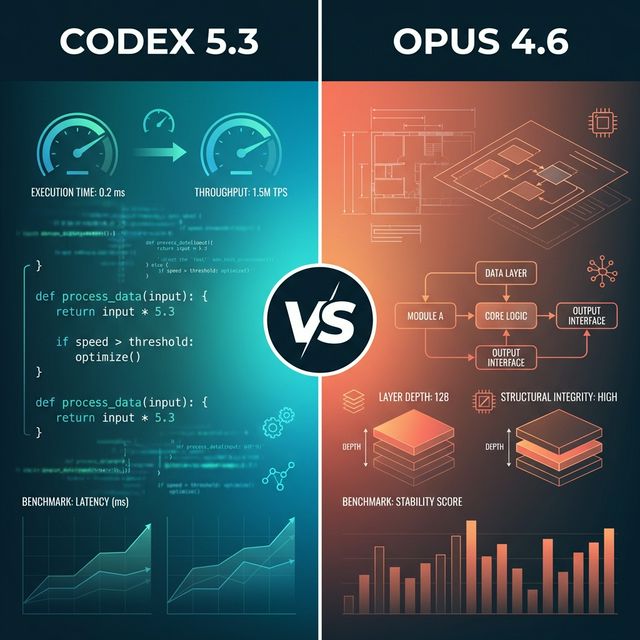

OpenAI drops GPT-5.3-Codex. Minutes later, Anthropic fires back with Claude Opus 4.6. The AI coding war just went nuclear. I’ve spent the whole night testing both, mining Reddit threads, and burning through API credits. Here’s what actually matters: Codex wins on speed and debugging. Opus dominates design accuracy and architectural depth. But the real answer? You need both.
The Benchmark Battle: Numbers That Actually Matter
Benchmarks lie. But these ones tell a story.
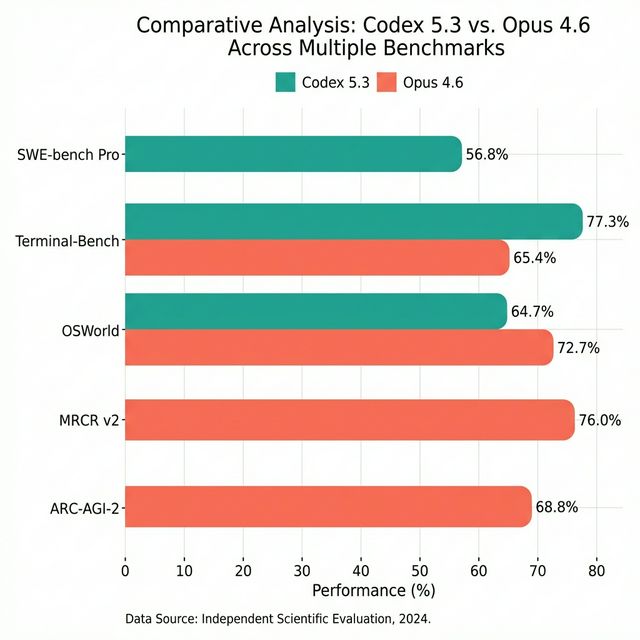
SWE-bench Pro measures real-world software engineering across four languages. Codex 5.3 hit 56.8% accuracy, which is a new industry record. Opus 4.6 hasn’t been officially tested on this benchmark, but given its focus on long-context reasoning rather than rapid code generation, it likely trails here.
Terminal-Bench 2.0 tests agentic coding—how well models handle command-line workflows. Codex scored 77.3%. Opus? 65.4%. Codex is faster, more decisive. Opus thinks longer.
OSWorld measures computer usage—can the model actually navigate a real OS? Opus crushes it at 72.7%. Codex comes in at 64.7%. When tasks require deep system understanding, Opus pulls ahead.
Long-Context Retrieval (MRCR v2) is where Opus flexes. The 8-needle 1M token variant? Opus scored 76%. That’s finding 8 specific pieces of information buried in a million tokens—roughly 750,000 words. Codex doesn’t even compete here. Opus 4.6 is the first model with a 1M token context window in its class.
ARC-AGI-2 tests problems easy for humans, hard for AI. Opus jumped from 37.6% (Opus 4.5) to 68.8%. That’s not incremental. That’s a paradigm shift in reasoning capability.
Speed? Codex is 25% faster than GPT-5.2-Codex. Opus is methodical, not fast.
The Verdict: Codex for speed and rapid iteration. Opus for depth and complex reasoning. Neither is universally better.
What Developers Actually Say (Reddit Doesn’t Lie)
I mined every Reddit thread, forum post, and Discord channel comparing these models. Here’s what developers who’ve shipped real code actually think.
Coding Workflows: Speed vs Depth
“Codex is a game changer for debugging,” one developer posted. “It automatically runs tests, catches edge cases I miss, and fixes bugs in seconds.” Multiple threads confirm: Codex excels at single-problem focus. You give it a bug, it hunts it down.
Opus? “Better at architectural analysis,” according to a senior engineer managing a 200K-line codebase. “I feed it my entire repo, and it suggests refactoring patterns I wouldn’t have considered.” That 1M token context window isn’t marketing—it’s a structural advantage for complex, multi-file problems.
The Speed Debate
Codex users report “much faster and possibly better than 5.2 because it automatically does a bunch of testing.” The visible token output feels snappier. Opus “thinks longer,” which frustrated some developers but impressed others. “It considers edge cases other models miss,” one user noted.
Community consensus: Codex wins on raw speed. Opus wins when you need the AI to think before it acts.
Design Work: The Clear Winner
I tested both on a finance app UI. Claude (Opus) followed my Figma design pixel-perfect—colors, spacing, layout. The code had minor bugs, but the visual output was accurate.
Codex? “Structural approximation” is the kindest description. It understood the concept but changed colors, broke spacing, and left buttons non-functional. Multiple Reddit threads confirm: Claude dominates design work. If you’re translating mockups to code, Opus 4.6 is the only choice.
Backend Development: Both Strong, Different Styles
Opus shines at architectural decisions. Its agent teams feature lets you spawn specialized agents—one for frontend, one for backend, one for security—that collaborate in real-time. For multi-day projects, this is transformative.
Codex produces cleaner, shorter code. “Codex gives me concise solutions,” one developer wrote. “Opus is more verbose but catches architectural issues I’d miss.”
The Pro Move: “Use both models and have them check each other’s work for the best possible outcome.” This showed up in multiple threads. Developers running both in parallel report fewer bugs and better architecture.
Pricing: The $100 vs $20 Question
Here’s where it gets interesting.
Codex 5.3 Pricing
ChatGPT Plus: $20/month
Access via web, CLI, IDE extension, iOS
Fixed usage limits for local messages, cloud tasks, code reviews
Best for: Individual developers, daily coding
ChatGPT Pro: $200/month
6x local/cloud task limits
10x code reviews
Priority request processing
Best for: Power users, agencies
ChatGPT Business: $30/user/month
Larger VMs for faster cloud tasks
Secure workspace, admin controls
Your data isn’t used for training
Best for: Teams, startups
API Pricing: Coming soon. For reference, GPT-5 costs $1.25/$10 per million input/output tokens.
Opus 4.6 Pricing
API: $5 per million input tokens, $25 per million output tokens
Premium Tier (>200K tokens): $10/$37.50 per million tokens
Cost Optimization:
Prompt caching: Up to 90% savings
Batch processing: 50% discount
The Value Calculation
Reddit is debating: Is Claude Max ($100/month) worth 5x ChatGPT Plus ($20/month)?
For subscription users: Codex Plus at $20/month is unbeatable for daily coding. You get CLI, IDE, web access, and predictable costs.
For API-heavy users: Opus 4.6 with prompt caching can be cheaper. If you’re processing large codebases repeatedly, that 90% caching discount matters.
Hybrid approach: Many developers run Codex Plus ($20/month) for daily work and pay-as-you-go Opus API for design and architecture. Total cost: $20-50/month depending on API usage.
API & CLI: Integration Capabilities
Both models offer robust developer tools, but with different philosophies.
Codex Integration
Codex App Server centralizes agent logic using a standardized protocol. This decouples the AI from the UI—whether you’re using CLI, IDE, or web, the agent behaves consistently.
Model Context Protocol (MCP) support means Codex can integrate with third-party APIs. Developers have configured the CLI to route queries to Claude, Grok, or Gemini by setting environment variables.
IDE Integration: Codex’s VS Code extension is sophisticated. It intelligently inherits context from open tabs, handles file navigation, and provides structured tools for grabbing context. “Much better IDE integration than Claude Code,” one developer noted.
Local Models: You can run Codex with Ollama for Llama models or GPT-OSS, giving you local inference options.
Opus Integration
SDKs: Official Python and TypeScript SDKs. Unofficial C# SDK available.
Tool Use: Opus excels at function calling and external tool integration. It can dynamically decide which third-party APIs to use based on the task.
Platform Integrations:
Amazon Bedrock
Google Cloud Vertex AI
Microsoft Foundry
GitHub Copilot (Pro, Business, Enterprise)
Streaming Output: Built-in support for handling large responses without HTTP timeouts.
Batch Processing: Asynchronous processing for large volumes of requests with cost savings.
The Integration Winner
Codex: Better IDE integration, more flexible CLI configuration, superior VS Code context handling.
Opus: Better API documentation, more enterprise platform integrations, stronger tool-use capabilities.
If you live in your IDE, Codex wins. If you’re building production systems with cloud integrations, Opus wins.
Cloud Features: Sandboxes vs Agent Teams
Codex Cloud
Codex runs in secure, isolated containers—ephemeral micro-VMs that load your codebase, configure the environment, and then cut off network access. If the agent makes a mistake, it only affects the temporary container, not your system.
Local Sandbox:
- macOS: Seatbelt policies
- Linux: seccomp + Landlock
- Windows: WSL or experimental native sandbox
Integrated Worktrees: Codex can work on multiple projects concurrently, switching context without losing state.
The Safety Advantage: Network access is disabled by default. You can enable it if needed, but the default is secure-by-design.
Claude Code
Agent Teams is the headline feature. You can assemble multiple specialized agents—frontend, backend, security, testing—that collaborate in real-time. They communicate directly, divide work, and aggregate results.
1M Token Context Window (beta) means Opus can hold your entire codebase, documentation, and conversation history in memory. No more “context rot” where the model forgets earlier decisions.
128K Output Tokens: Opus can generate massive outputs—entire modules, comprehensive documentation, multi-file refactors.
Adaptive Thinking: Opus decides when to engage deeper reasoning for complex tasks. It’s not always thinking hard—it’s thinking smart.
Developer Experience
Codex: 25% faster, better CLI UX, more responsive for rapid iteration.
Opus: Better for multi-day projects where architectural consistency matters more than speed.
One developer summed it up: “Codex feels like a fast junior developer. Opus feels like a thoughtful senior architect.”
Design vs Backend: Strengths Breakdown
Frontend/Design Work: Opus Wins
I tested both on translating a Figma design to React. Claude (Opus) nailed it:
- Colors matched exactly
- Spacing was pixel-perfect
- Layout was responsive
- Code had minor bugs but was 90% functional
Codex gave me:
- Structural approximation
- Different colors
- Broken spacing
- Non-functional buttons
Reddit confirms: “Claude is a clear winner for design. It follows images accurately. Codex creates approximations.”
Winner: Opus 4.6 for any design-to-code workflow.
Backend/Systems Work: Both Strong, Different Styles
Opus 4.6 Strengths:
Architectural decision support (compares Clean Architecture vs Vertical Slice)
Agent-based system (Researcher agent reads docs, Backend agent implements)
200K-1M token context for analyzing entire codebases
Superior complex algorithm implementation
Codex 5.3 Strengths:
Cleaner, shorter code
Faster execution
Better for well-defined plans
Excellent debugging (automatically runs tests, catches edge cases)
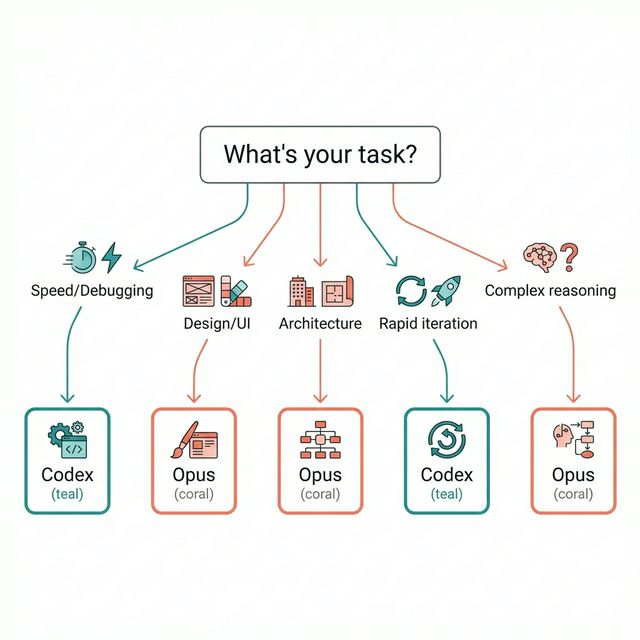
Use Case Matrix:
Codex: Speed-critical tasks, debugging, single-focus problems, rapid iteration
Opus: Architectural analysis, design work, multi-day projects, complex reasoning
One developer managing a macOS app with complex Swift concurrency tested both. Opus excelled at “architecture cold reads”—understanding unfamiliar codebases. Codex was faster at implementing specific features once the architecture was clear.
Which Plan Should You Choose?
For Individual Developers
Codex Plus ($20/month): Best for daily coding, debugging, rapid iteration. You get CLI, IDE, web, and iOS access with predictable costs.
Opus API (pay-as-you-go): Best for design work, architectural planning, occasional deep analysis. With prompt caching, costs stay low.
Hybrid Approach: Run Codex Plus for daily work. Use Opus API for design and architecture. Total: $20-50/month.
For Teams
Codex Business ($30/user/month): Fixed costs, secure workspace, larger VMs. Best for teams that want predictable budgets.
Opus API + Batch Processing: Cost-effective for large-scale operations. 50% discount on batch processing, 90% savings with prompt caching.
Decision Point: If your team ships fast and iterates daily, Codex Business. If you’re building complex systems with deep architectural requirements, Opus API.
For Enterprises
Codex Enterprise: Custom pricing, usage monitoring, audit logs, enterprise-grade security.
Opus on Bedrock/Vertex AI: Cloud integration, compliance controls, data residency options.
The Enterprise Reality: Most large companies run both. Codex for developer productivity. Opus for architectural reviews and design systems.
Decision Framework
Budget-Conscious: Codex Plus ($20/month) + Opus API (pay-as-you-go). Total: $20-50/month.
Speed-Focused: Codex Pro ($200/month). 6x task limits, 10x code reviews.
Quality-Focused: Opus 4.6 with extended thinking and agent teams. Slower but more thorough.
Best of Both Worlds: Dual subscription. Use Codex for speed, Opus for validation. “The pro move is to use both and have them check each other’s work.”
Final Verdict: Context Is King
There’s no universal winner. The right model depends on your workflow.
Choose Codex 5.3 if:
- You need speed and rapid iteration
- You’re debugging existing code
- You want predictable subscription costs
- You live in your IDE and need tight integration
Choose Opus 4.6 if:
- You’re translating designs to code
- You need architectural analysis
- You’re working on multi-day, complex projects
- You want the deepest reasoning capabilities
Choose Both if:
- You want the best possible code quality
- You can afford $20-50/month for hybrid usage
- You value cross-validation (one model checks the other)
The AI coding war isn’t about picking sides. It’s about picking the right tool for the job. Codex is your fast, precise scalpel. Opus is your thoughtful, comprehensive surgeon.
And when API access for Codex drops? This entire comparison shifts. Pay-per-token Codex could undercut Opus on price while maintaining speed advantages. But until then, the hybrid approach wins.
My Setup: Codex Plus ($20/month) for daily coding. Opus API for design work and architectural reviews. Total cost: ~$35/month. Zero regrets.
The future of coding isn’t choosing between models. It’s orchestrating them.