

Here’s something that sounds too good to be true: take any LLM, feed it the same information, but use 90% fewer tokens. No model fine-tuning. No complex infrastructure. Just a simple trick from a DeepSeek paper that actually works.
I know what you’re thinking. Another overhyped technique that barely works in practice. But I tested this myself with just 30 minutes, Claude Code, no fancy setup. Same context, same question, different format. The results? One agent used 12,800 tokens for just the message. The other? 5,800 tokens. That’s a 55% reduction in a half-hour experiment.
The wild part? This was the most basic implementation possible. With proper optimization, you can push those savings way higher.
What DeepSeek Actually Discovered
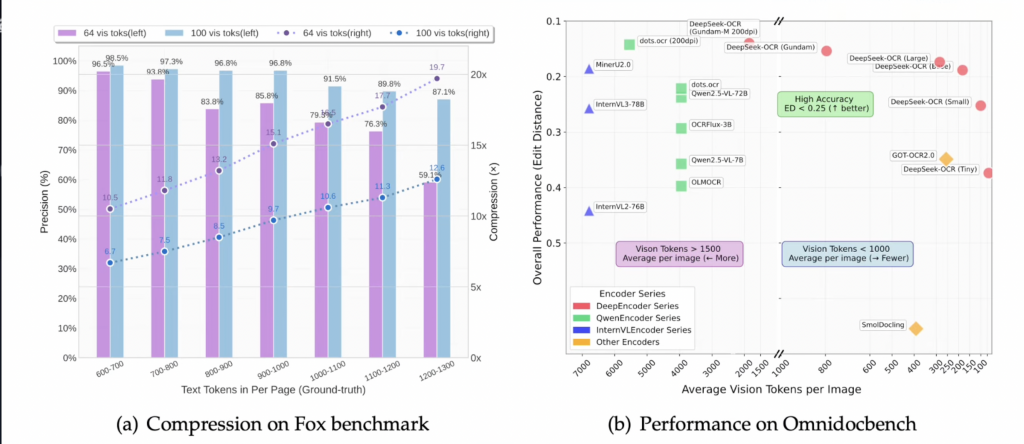
Back in October 2025, DeepSeek published a paper introducing DeepSeek-OCR, and it fundamentally changes how we should think about context windows. The core insight is brilliantly simple: instead of feeding text to your LLM, convert it to images first.
Why does this work? Vision encoders compress information far more efficiently than text tokens. DeepSeek’s system, which they call “optical context compression,” achieves:
- 7-20x token reduction compared to raw text
- 97% fidelity at 10x compression ratio
- Industrial scale processing – hundreds of thousands of pages per day on a single NVIDIA A100
Here’s the technical breakdown. DeepSeek-OCR uses a two-part architecture:
DeepEncoder: Combines SAM (Segment Anything Model) for local segmentation, CLIP for global context, and a 16x convolutional compressor to reduce visual tokens.
DeepSeek3B-MoE-A570M: Acts as the decoder, reconstructing text from compressed visual representations with remarkable accuracy.
A 1,000-word article typically compresses into approximately 100 vision tokens. That’s a 10:1 ratio while maintaining 97% OCR precision. Even at an aggressive 20x compression, the system still achieves around 60% accuracy.
And this isn’t just a lab curiosity. The practical benefits are immediate: lower API costs, reduced latency for long prompts, and the ability to cram way more information into your context window.
HERE IS YOUR TRICK THAT YOU ARE LOOKING FOR : The 30-Minute Implementation Test
So does this actually work for real-world use cases? I gave myself 30 minutes to find out.
The test setup was straightforward. I took the article i wrotes yesterday – about 9,300 tokens, roughly 36 kilobytes of text. Then I asked Claude to build a Python tool that converts text into images.
After some iteration (getting the formatting right, testing different image sizes, adjusting font sizes), I landed on seven images that contained the entire transcript. Claude Code itself estimated a 58% token saving, but the real numbers were more interesting.
SO STEP ONE: Ask Claude or any other free chat model to convert your transcript into IMAGES
STEP TWO: Just use those images insead of text (Thats it)
The Needle in a Haystack Test
I set up two identical instances of Claude 4.5 Sonnet. Both got the same question: “why openai made a deal with Cerebras“
Instance 1 (text-based): Received the raw transcript file
Instance 2 (image-based): Received the seven images in a separate folder
Both successfully extracted the quote: “OpenAI’s revenue growth is directly constrained by how many GPUs they can buy.” – along with the surrounding context. The accuracy was basically identical.
But the token counts tell the real story:
| Method | Total Tokens | Message Tokens | Reduction |
|---|---|---|---|
| Raw Text | 35,000 | 12,800 | – |
| Images | 27,500 | 5,800 | 55% |
That’s a 55% reduction in message tokens. And remember – this was the most naive implementation possible, built in 30 minutes. No optimization. No tuning. Just converting text to images and feeding them to Claude.
What happens when you actually optimize this? You can push way higher. Better compression algorithms, optimized image formats, smarter text layout – there’s so much headroom here.
From Images to Video: Claude Brain’s Genius Move
Okay, so storing context in images works. But what happens when you have hundreds of images? That’s where things get really interesting.
Some clever folks realized: when you have multiple images in sequence, you actually have a video. Enter Claude Brain, a project that gives Claude Code photographic memory using video files.
The concept is beautiful in its simplicity. Instead of maintaining a database or cloud storage, Claude Brain stores all your conversation history, decisions, bugs, and solutions in a single .mv2 video file.
The specifications are kind of insane:
- Empty file: 70 kilobytes
- Growth rate: 1 kilobyte per memory
- A year of daily use: less than 5 megabytes
- No database required
- No cloud service needed
- No API keys
Your entire project memory lives in one portable file. Want to version control Claude’s brain? git commit. Need to transfer knowledge to a teammate? scp. Instant onboarding without any setup.
How to Use Claude Brain Right Now
Installation takes literally 30 seconds if you’ve used GitHub plugins before:
One-time setup (if you haven’t used GitHub plugins before)
git config –global url.”https://github.com/”.insteadOf “git@github.com:”
/plugin add marketplace memvid/claude-brain
Then go to /plugins → Installed → mind → Enable Plugin → Restart.
Done. Your project now has this structure:
your-project/
└── .claude/
└── mind.mv2   # Claude's entire brain
What gets captured:
- Session context and architectural decisions
- Bug fixes and their solutions
- Auto-injected at every session start
- Fully searchable anytime
Key commands:/mind stats # Memory statistics
/mind search "authentication"     # Find past context
/mind ask "why did we choose X?"  # Ask your memory
/mind recent                      # Recent activity
Or just ask naturally: "mind stats", "search my memory for auth bugs".
For power users who want direct file access, there's a CLI:
npm install -g memvid-cli
memvid stats .claude/mind.mv2           # View stats
memvid find .claude/mind.mv2 "auth"     # Search
memvid ask .claude/mind.mv2 "why JWT?"  # Query
memvid timeline .claude/mind.mv2        # Timeline view
Why This Actually Matters
Look, we’ve had 200K context windows for a while now. Claude 4.5 can handle massive amounts of text. But here’s the thing – context windows don’t solve the memory problem.
You’re still paying for every token. Latency still increases with prompt length. And between sessions? The model remembers nothing.
What DeepSeek’s optical compression and Claude Brain represent is a different approach entirely. Instead of just scaling context windows larger, we’re making the information denser. More context, fewer tokens, lower costs.
The implications are pretty significant:
For developers: Dramatically lower API costs without sacrificing functionality. That massive codebase you need to reference? Compress it into images. Those thousands of documentation pages? Same deal.
For long-running projects: Persistent memory that survives between sessions. Claude Brain remembers your architectural decisions, your coding standards, your past bug fixes – all in a 5MB file.
For context-heavy applications: Customer support bots with full conversation history. Research assistants with entire libraries at their fingertips. Code review tools with your entire git history compressed efficiently.
And we’re just scratching the surface here. The DeepSeek paper showed 7-20x compression with their optimized system. My 30-minute hack got 55%. Somewhere between those two extremes is the practical sweet spot for most applications.
The Bottom Line
When I first saw claims of “10x context window expansion,” I was skeptical. The AI space is full of oversold promises. But after spending 30 minutes building a basic implementation and seeing 55% token reduction with zero optimization, I’m convinced this is real.
DeepSeek-OCR’s optical compression achieves 97% fidelity at 10x compression. Claude Brain demonstrates that video-based memory can be both tiny (1KB per memory) and incredibly practical. The technology works, it’s accessible, and you can start using it today.
Will this replace traditional text inputs entirely? Probably not. But for specific use cases – long reference documents, persistent memory, cost optimization – this is a game changer. The 200K context window just got a whole lot more useful.
FAQ
Is image-based context compression as accurate as text?
At 10x compression, DeepSeek-OCR maintains 97% fidelity. In my basic test, both text and image-based approaches extracted identical information. For most practical applications, the accuracy difference is negligible, but mission-critical applications should test thoroughly.
Does Claude Brain work with other LLMs besides Claude?
The underlying memvid library works with GPT, Claude, and Gemini. However, Claude Brain is specifically designed as a plugin for Claude Code. For other LLMs, you’d need to use the memvid-cli directly or build custom integrations.
What’s the file size limit for .mv2 memory files?
Claude Brain grows at approximately 1KB per memory entry. Even with heavy daily use, a year of memories typically stays under 5MB. The format is extremely space-efficient compared to traditional database approaches.
Can I use this technique with local LLMs?
Absolutely. The optical compression technique works with any vision-language model that can process images. You’d need to adapt the implementation for your specific model’s API, but the core concept – converting text to images to save tokens – applies universally.
How does this compare to traditional RAG (Retrieval Augmented Generation)?
RAG retrieves relevant chunks at query time, while optical compression feeds the entire compressed context upfront. They solve different problems. RAG is better when you have massive knowledge bases and only need specific pieces. Optical compression shines when you need the full context available but want to minimize tokens.
External Links: DeepSeek-OCR Paper (arXiv), Claude Brain GitHub